Overview
Deposit Collection Links let you collect a security deposit from your guests quickly and securely — without needing to take their card details over the phone or in person. You generate a unique link, send it to your guest, and they submit their card details directly through a secure, PCI-compliant form. The card is placed on hold for the deposit amount, and you decide later whether to charge it, release it, or refund it.
Only 3D-Secure cards are accepted, which adds an extra layer of protection against fraud.
How to Generate a Deposit Collection Link
- Open the booking's Charge and Payments screen.

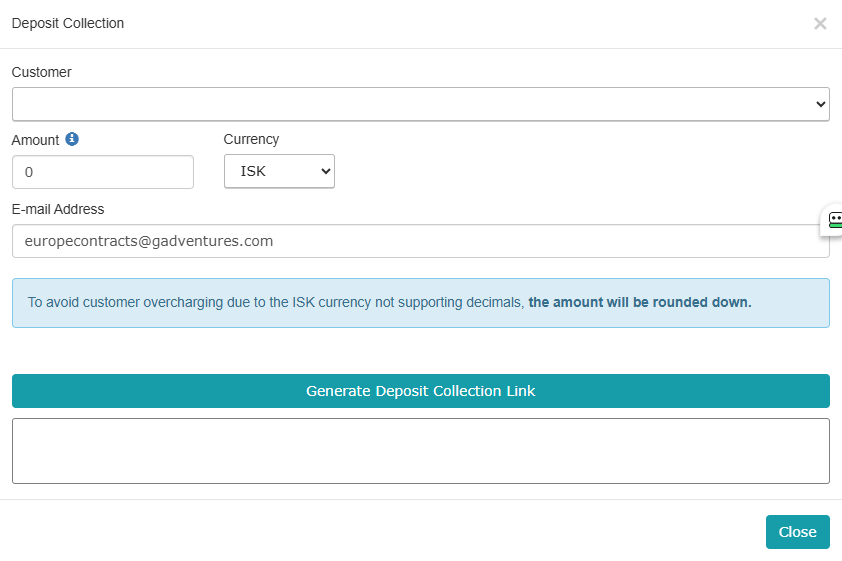
- Click the Deposit Collection button, located next to the Payment Links button.

- In the modal that opens, you'll see:
- Customer – pulled from the booking
- Amount – defaults to 0; enter the deposit amount you want to hold. This is entered independently and won't affect the booking's balance.
- Currency – pre-filled based on the customer record
- E-mail Address – pre-filled from the guest's record
- Click Generate Deposit Collection Link.
Note: The Generate button is only active if the booking's check-in date is within the next 3 days. If check-in is further out, you'll need to wait until it's within that window before generating the link.
Note for ISK bookings: Since Icelandic Króna doesn't support decimals, deposit amounts in ISK are automatically rounded down.
Managing the Link
Once a link is generated, you have four actions available:
| Action | What it does |
|---|---|
| Send via E-mail | Sends the link to the guest's e-mail on file, along with booking details and the deposit amount |
| Copy Link | Copies the link so you can share it however you prefer (SMS, chat, etc.) |
| Disable Link | Deactivates the link - the guest will see a message and won't be able to submit card details |
A link automatically deactivates itself once the guest successfully submits their card, so it can't be reused or shared further.
What the Guest Sees
When your guest opens the link, they'll see a simple, secure page showing:
- Their name and booking dates
- The deposit amount and currency
- A card entry form (card number, expiration, CVV, name on card)
The page clearly explains that the card will not be charged at this time — only a temporary hold is being placed for the deposit. Guests are asked not to use their browser's back button after submitting.
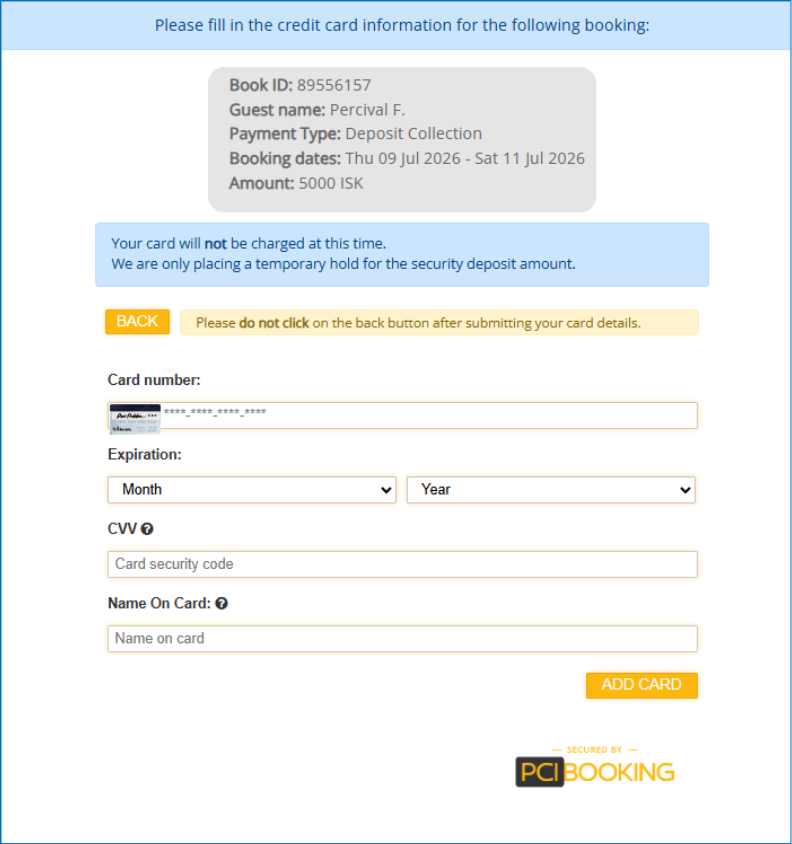
If a link has already been used or was disabled, the guest sees a message instead of the form.
After the Guest Submits Their Card
Once submitted successfully, a hold (pre-authorization) is placed on the guest's card for the deposit amount. From this point, you can manage the deposit from the booking's existing operations modal, with the following actions available:
- Capture - charge the held amount (in full or in part)
- Void - release the hold without charging
- Refund (full or partial) - refund a previously captured amount
Important: A card collected via a Deposit Collection Link can only be used for these operations. Direct charges are not permitted on it, and it cannot be used for auto-charging - if you need auto-charge capability, a separate card (physical or virtual) will still need to be added via a Payment Link or Pay Button.
Booking Info Codes
As a deposit moves through its lifecycle, you'll see the following info codes added to the booking, so you can track its status at a glance:
| When it happens | Info code shown |
|---|---|
| Guest submits their card successfully | DEPOSIT_AUTHORIZED |
| Deposit is captured (charged) | DEPOSIT_CAPTURED |
| Deposit is voided — either manually or automatically after checkout | DEPOSIT_RELEASED |
Default Statuses
- The charge line created on capture has no status set by default.
- The payment line takes on whatever default status is configured for your payment processor.
If you'd like custom default statuses for these lines, this isn't self-service yet — just reach out to our support team and we'll set it up for you.
Automatic Release
If a deposit hold is never captured or voided, it will be automatically released 2 days after the guest's checkout date - so you don't need to worry about holds lingering indefinitely if no action is taken.
Invoicing
- When a deposit is captured, a Security Deposit charge line is added to the booking invoice, to balance out the payment line from the operation.
- On a partial refund, that line is updated to reflect the remaining captured amount.
- On a full refund, the line is removed entirely.
- Placing or releasing the hold itself (before any capture) does not add anything to the invoice.
- The deposit amount is kept separate from the booking's balance and other charges throughout.
Before You Start
To use Deposit Collection Links, you'll need a payment processor already connected to your account. If you'd like this feature activated, please reach out to our support team at your convenience and we'll get it set up for you
Was this article helpful?
That’s Great!
Thank you for your feedback
Sorry! We couldn't be helpful
Thank you for your feedback
Feedback sent
We appreciate your effort and will try to fix the article